%201.png)
Key takeaways
- WebMCP is a proposed browser standard that lets a page hand an AI agent a list of callable tools, instead of leaving the agent to scrape the DOM and guess which button to click. Chrome's own docs describe it as a proposed web standard, currently in an origin trial — not a shipped, cross-browser feature.
- Most write-ups you will find give the API as navigator.modelContext. Chrome's imperative-API page, last updated 11 September 2026, uses document.modelContext.registerTool. The surface has already been renamed at least once, which tells you more about how settled this is than any adoption statistic.
- On a Webflow marketing site the declarative half is genuinely cheap — two custom attributes on a form. The parts that break are Webflow-specific: page-transition libraries swap the DOM out from under registered tools, and hidden required anti-spam fields make a form an agent cannot legitimately complete.
WebMCP is a proposed browser standard that lets a website declare what it can do as a list of callable tools, so an AI agent in the browser can invoke them directly instead of simulating clicks and typing. Google's Chrome team documents it as a way to improve "the performance and reliability of agent actuation" — actuation being their word for an agent pretending to be a human with a mouse. On a Webflow site the cheap half is two HTML attributes on a form. The expensive half is everything Webflow does to your page after you add them.
We build B2B SaaS marketing sites in Webflow, so the question we actually get asked is narrower than "what is WebMCP": is there anything here worth shipping this quarter, on a site whose job is to get a demo booked? This is what we found when we went through Chrome's documentation and then looked at our own published markup.
What WebMCP actually is
WebMCP lets a page register tools. A tool has a name, a description written for a machine to read, a JSON Schema describing its inputs, and a function that runs when an agent calls it. The browser is the middleman: it collects the tools a page has registered and offers them to whatever agent is driving.
Chrome's documentation frames the benefit as removing guesswork. Their phrasing: "Instead of an agent reviewing the element, such as a button or a field, to understand its purpose, the website declares the element's purpose, so it's used correctly." They list three things the standard provides — discovery (a standard way for pages to register tools), JSON Schemas ("explicit definitions of inputs and expected outputs, to reduce hallucination or misunderstanding"), and state (a shared understanding of the current page context).
Two details matter more than the pitch. First, it is explicitly a progressive enhancement — the page still works normally for humans, and an agent without WebMCP support falls back to scraping as before. Second, tools execute visibly on your page. Chrome's argument for that is trust: the user watches the thing happen in your interface, in your design, rather than in some agent's summary of it.
The API name most articles get wrong
If you read around this topic you will mostly see the entry point given as navigator.modelContext. Chrome's own imperative-API page, published 18 May 2026 and last updated 11 September 2026, uses document.modelContext.registerTool. Their security page, updated 1 September 2026, says the same thing in prose: "The WebMCP document.modelContext.registerTool API only exposes the tool's functionality to agents."
Earlier write-ups are not lying; they were right when they were written. The surface has been renamed at least twice — commentary from February 2026 records an even earlier window.agent spelling. We are flagging it because it is the most useful single fact here for anyone planning work: an API that has been renamed twice in under a year is not an API to hard-code into fifty client sites. Copying a snippet from a blog post written six months ago will currently give you code that silently does nothing.
A registered tool takes four required fields — name, description, inputSchema (JSON Schema), and an async execute function. Chrome also documents optional annotation hints, which are the part worth understanding before you ship anything: readOnlyHint for tools that do not change state, consequentialHint for "high-stakes or non-reversible actions, such as booking travel or transferring money", and untrustedContentHint for tools that return user-generated or externally sourced content.
It is not llms.txt, and it is not MCP
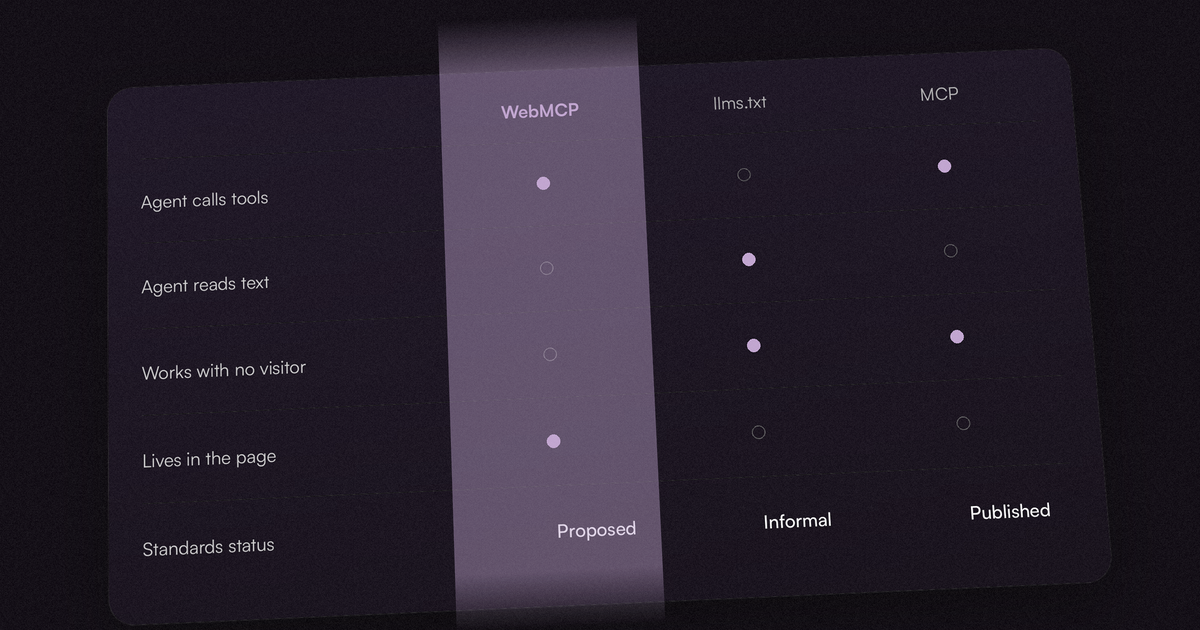
These three get conflated constantly, and they solve genuinely different problems. We wrote about llms.txt on Webflow separately; the short version is that llms.txt is a file an agent reads, and WebMCP is a set of actions an agent calls.
On the MCP question Chrome is unusually direct, because they clearly get asked it a lot. Their comparison page opens by naming the misunderstanding: "Will WebMCP replace Model Context Protocol (MCP)?" — and answers that "WebMCP is not an extension or a replacement of MCP." The distinction they draw is where the functionality lives. MCP is backend, universal, reachable by any agent on any platform. WebMCP is frontend, exists only while someone is on your page, and talks only to the browser's agent.
Their own analogy is a call centre versus an in-store expert. It is a good one, and it also quietly explains why a marketing site is a weak candidate: an in-store expert is valuable when there is something to do in the store.
| llms.txt | WebMCP | MCP | |
|---|---|---|---|
| What it gives the agent | Text to read | Tools to call | Tools to call |
| Where it lives | A file at your root | In the page, in the browser | On a server |
| Works when nobody is on your site | Yes | Noneeds an open page | Yes |
| Standards status | Informal spec | Proposedorigin trial | Published spec |
| Effort on a Webflow marketing site | One file | Attributes, or custom code | A backend you may not have |
What shipping it on Webflow actually involves
There are two APIs, and on Webflow they have very different costs.
The declarative API turns an existing HTML form into a tool with two attributes on the form element: toolname and tooldescription. Individual fields can take a toolparamdescription; without one, Chrome's docs say the browser falls back to the field's label, and then to its aria-description. The browser generates the JSON Schema from the form itself. In Webflow this is the custom-attributes panel on the form element — no code, no plugin, and it degrades to nothing on browsers that do not support it. Chrome's documentation notes a nice property for anyone nervous about handing control away: when an agent calls the tool, "the browser brings the form into focus and populates its field. The form remains visible to the user."
The imperative API is JavaScript, so on Webflow it goes in Site Settings custom code or a page embed. That is where the real work is, and where most of the trouble is too.
The origin trial adds one more step. Chrome accepts a trial token as a meta tag in the head — so on Webflow it goes in the head custom code field, which is a paid-plan feature. Worth knowing before you promise a client a date: a trial is a time-boxed experiment, and when it ends the feature stops working on your site until it ships for real or you re-enrol.
Three things that break this on a real Webflow site
These are not theoretical. We checked them against our own published markup on 21 September 2026.
1. Page-transition libraries swap the DOM out from under you. Our own site serves its pages with Barba-style client-side transitions — the markup carries data-barba and data-barba-namespace attributes. A tool registered imperatively on page load is registered against a document that a transition then replaces. Unless you re-register on every transition, an agent arriving after the visitor has clicked two links sees a stale tool list, or none. Any Webflow site running page transitions, a common template feature, has this problem and will not notice it in testing, because the first page load always works.
2. Hidden required fields make a form an agent cannot honestly complete. Our contact form carries a required checkbox styled with opacity:0, absolute positioning and a negative z-index — a standard anti-spam honeypot, invisible to a human and pre-handled by Webflow's own script. Hand that same form to an agent as a declared tool and you have described a form with a required field that nothing in the visible UI explains. The anti-bot measure and the invite-the-bot-in measure are in direct conflict, and you have to decide which one you meant.
3. Webflow's field names are not descriptions. Our form's fields are named Full-Name, Company-Name, E-Mail, field and Description. "field" is a select — the one asking what kind of project someone has. A schema generated from that markup describes a parameter called "field" with no indication of what it means. That is exactly the gap toolparamdescription exists to close, and it is the single highest-value ten minutes of this whole exercise: naming your parameters for a reader who has never seen your page.
Where the standard actually stands
We want to be careful here, because this is the part of the topic where confident claims outnumber sources.
What we can verify from primary documentation: Chrome documents WebMCP as a proposed web standard, with an explainer, a Chrome Status entry, a GitHub repository and an origin trial linked from every page of its docs. The docs are actively maintained — pages carry last-updated dates through September 2026.
What we could not verify: several posts state that WebKit has taken a formal "oppose" position on WebMCP. We checked WebKit's published standards-positions summary on 21 September 2026 and found no WebMCP entry in it at all. That is not the same as WebKit supporting it — a position can exist as an open discussion before it reaches the published summary — but it does mean the flat claim "WebKit has opposed WebMCP" is not backed by WebKit's own list today. We mention it because that claim is being repeated as settled fact, and because a marketing team deciding whether to fund this work deserves to know which parts are documented and which are somebody's summary of a GitHub thread.
The honest state of play: one browser engine is running a trial, the specification is a proposal, and the entry point has been renamed twice. That is an early-stage standard, and early-stage standards are fine — as long as nobody has told a client it is a feature.
The security part nobody puts in the summary
Chrome publishes a dedicated tool-security page, and it is franker than most vendor documentation. Their framing: because language models "treat all text, instructions, and user data as a single sequence of tokens, they're susceptible to indirect prompt injection". And then, plainly: "While some models have layers that address prompt injection, it's impossible to guarantee safety inside of a large language model."
Two attack surfaces follow directly from what WebMCP is. Tool descriptions are text an agent reads and trusts, so a compromised description is an instruction channel. And tool outputs are text too — if your tool returns user-generated content, whatever a stranger typed into your site is now being read by an agent acting on someone's behalf. That is what untrustedContentHint is for.
For a marketing site this is mostly an argument for restraint rather than alarm. A tool that searches your blog is low-stakes. A tool that submits a form which triggers an email to your sales team is a tool that a bad actor can now call at scale, without a browser, without your anti-spam script, and without a human ever seeing the page. If you expose a form, keep the readOnlyHint distinction honest and assume the tool will be called by something other than the well-behaved agent in the demo video.
Is it worth doing on a B2B SaaS marketing site?
Mostly not yet — and we would rather say that than sell the work.
The value of WebMCP scales with how much there is to do on your site. Chrome's own examples are ordering, filtering results, checking order status, booking appointments — transactional interfaces with real state. A B2B SaaS marketing site has, typically, one meaningful action: book a demo or start a trial. Declaring that one action as a tool is a small, cheap, low-risk enhancement. It is not a strategy, and it will not show up in your pipeline this quarter.
There is a version of this that is worth planning for now, and it is not on the marketing site at all: if you have a logged-in product with a UI agents will plausibly be asked to drive, that is where the in-store-expert analogy earns its keep. The marketing site is the brochure. The app is the shop.
Our own bias, disclosed: we sell Webflow builds and retainers, and "there is a new standard, let us implement it" is an easy thing for an agency to sell. We have written before about what our own AI-visibility work actually produced, which was considerably less than the pitch would suggest. The same discipline applies here. Add the two attributes to your demo form, name your parameters properly, and spend the rest of the budget on the thing that still decides whether a stranger books a call.
| Your situation | Our pick | Why |
|---|---|---|
| A marketing site with one demo form | Declarative only | Two attributes and good parameter descriptions. Half an hour, no code, nothing to maintain. |
| A marketing site running page transitions | Declarative only | The imperative API needs re-registration on every transition. Not worth the maintenance yet. |
| A logged-in product UI with real state | Worth planning | This is the case the standard was designed for. Prototype behind the origin trial. |
| Anything where a tool call costs money | Wait | Use consequentialHint, and treat the whole surface as callable by something hostile. |
FAQ
What is WebMCP?
WebMCP is a proposed browser standard that lets a web page declare its features as structured tools — each with a name, a machine-readable description and a JSON Schema for its inputs — so an AI agent running in the browser can call them directly instead of simulating clicks and keystrokes. Chrome documents it as a progressive enhancement: the page keeps working normally for human visitors, and agents without support fall back to reading the page as before.
Is WebMCP the same as MCP?
No, and Chrome's documentation addresses this directly: "WebMCP is not an extension or a replacement of MCP." The difference is where the functionality lives. MCP is a backend protocol — an agent can reach it any time, from any platform, whether or not anyone is on your website. WebMCP is frontend, exists only while a page is open in the browser, and talks only to the browser's own agent. Chrome's analogy is a call centre versus an in-store expert.
Do I need llms.txt if I have WebMCP?
They do different jobs, so one does not remove the need for the other. llms.txt is a file an agent reads to understand what your site is and what it contains. WebMCP is a set of actions an agent can execute. A reference file does not let anything book a demo, and a booking tool does not tell anyone what you do. On a marketing site the reading half is currently the one carrying more weight, simply because far more agents read pages than act on them.
Can you add WebMCP to a Webflow site without custom code?
Partly. The declarative API needs only two custom attributes on a form element — toolname and tooldescription — which you set in Webflow's custom-attributes panel, with optional toolparamdescription attributes on individual fields. That is genuinely no-code. The imperative JavaScript API, and the origin trial token that currently gates the feature, both need custom code, which on Webflow means a paid plan with access to the head custom-code field.
Is WebMCP safe to expose on a contact form?
Treat it as a public, scriptable endpoint, because that is what it becomes. Chrome's own security guidance is blunt that prompt injection cannot be fully prevented inside a language model. Two specific Webflow problems: a hidden required honeypot field makes your form impossible for an honest agent to complete, and a declared submit tool can be called without your anti-spam script ever running. If the form triggers a real notification to a human, assume it will be called by something other than a well-behaved agent.