%201.png)
Key takeaways
- At the plan a 20-500 person SaaS actually buys, the cheaper platform is Webflow, not Framer: Webflow Premium is $25/mo against Framer Pro at $30/mo, with 20,000 CMS items and 40 Collections against 2,500 and 10.
- Framer wins outright on localisation price ($20 per locale, published) and puts staging and branching inside the site plan; Webflow splits its cost across a Site plan and a Workspace plan.
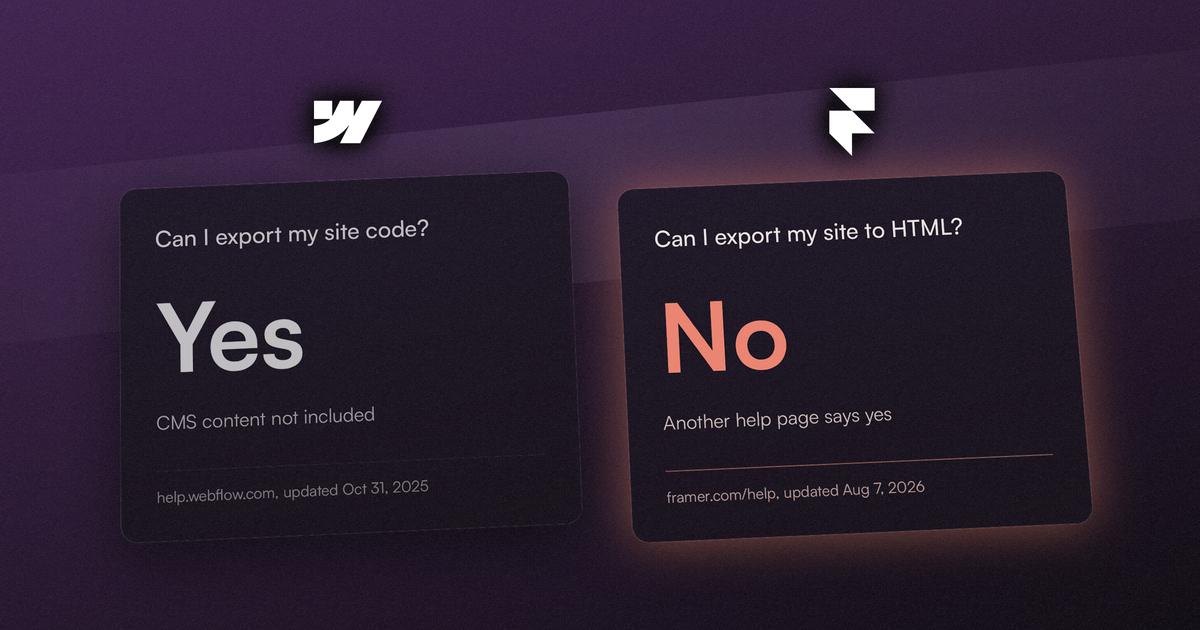
- Neither platform hands you a working site if you leave. Webflow's code export excludes all CMS content; Framer's own help centre answers the export question both ways, on two pages updated the same day.
For a B2B SaaS marketing site the choice comes down to three things: how much content the CMS will hold, how much SEO and hosting control you get at the plan you will actually be on, and what you can take with you if you leave. Framer wins on speed to a first page and on localisation price. Webflow wins on almost everything that compounds after month six.
Every number below was read off each vendor's own pricing page on 23 September 2026 at yearly billing, and every export claim off their own help centres. Where the two vendors publish different kinds of numbers, we say so instead of forcing a comparison.
One disclosure first, because it should change how you read the rest: we are a Webflow agency, so we have a commercial interest in one of these answers. Protect yourself from that by checking the sources rather than trusting the conclusion - every one is a vendor page you can open, named with its date. Where Framer is the better answer, this article says so.
The decision in one table
Most comparisons put the entry plans side by side. That is the wrong row to read, because neither entry plan fits this buyer. A B2B SaaS marketing site has a blog, case studies, authors and categories at minimum, which needs a CMS, and any redesign changes URLs, which needs redirects.
On Webflow that means the Premium site plan, because Basic has no CMS at all. On Framer it means Pro, because Framer's pricing page lists site redirects, a staging environment and branching as Pro features, and Basic ships two CMS Collections. So the honest comparison is Premium against Pro.
| Webflow Premium | Framer Pro | |
|---|---|---|
| Published price | $25/mobilled yearly, per site | $30/mobilled yearly, per site |
| CMS Collections | 40 | 1040 with add-ons |
| CMS items | 20,000 | 2,50040,000 with add-ons |
| Pages | 300static pages, Basic and up | 150700 max with add-ons |
| Site redirects | Paid site plans | Pro only |
| Localisation | Optional add-on2 locales on Team | $20 per locale, up to 20 |
| Code export | Workspace Core+$19/mo, no CMS content | Not offered |
At the tier you actually buy, the cheaper platform is the other one
Framer is usually sold as the cheaper option, and at the entry tier it is: $10/mo against Webflow's $15/mo. That comparison stops being true the moment you need a CMS.
Webflow Premium is $25/mo billed yearly. Framer Pro is $30/mo billed yearly. At that pairing Webflow is five dollars a month cheaper and ships eight times the CMS item ceiling (20,000 against 2,500) and four times the Collections (40 against 10). For a marketing site that will publish two articles a week for three years, that is not a theoretical ceiling.
There is a second thing on Framer's own pricing page worth knowing before you pay them anything. Framer's FAQ says the Free plan includes "10 CMS collections, 1,000 pages, 5 MB file uploads, and one free locale to try". The Basic plan at $10/mo lists 2 CMS Collections and 30 pages. Paying Framer its first ten dollars a month can cost you eight Collections and most of your page budget - the upgrade path narrows before it widens.
The honest counterweight, and it is a real one. Webflow's cost is two subscriptions, not one. The Site plan is per site; the Workspace plan is per team and is where several things a marketing team wants actually live - code export on Core at $19/mo, and site-level roles and publishing permissions on Growth at $49/mo. Framer is one subscription with per-editor pricing on top: $20 per additional editor per month, $10 for a content-only editor, viewers free, ten seats on Basic and Pro. For a small team that needs code export, Webflow Premium plus Workspace Core is $44/mo against Framer Pro's $30. Run the arithmetic for your own seat count rather than taking either headline price at face value, and if you want the agency-side numbers instead of the platform ones they are in our Webflow agency cost guide.
Where Framer genuinely wins
The SERP for this query is full of agency posts that concede nothing. These are the places where, reading both pricing pages side by side, Framer is simply the better answer.
Localisation price. Framer publishes a number you can budget against: $20 per locale, up to 20 locales, on Basic and Pro alike. Webflow lists Localize as an optional add-on on its site plans with no per-locale price on the pricing page, and includes two locales in the Team plan at $2,500/mo on an annual contract. If you need five languages and you are not buying Team, Framer is the only one of the two whose multilingual cost you can put in a spreadsheet today.
Staging and branching sit in the site plan. Framer puts a staging environment and branching with previews inside Pro at $30/mo. On Webflow, staging sites and the collaboration controls around them are a Workspace plan feature, which is the second subscription. A three-person marketing team that wants to review changes before they go live reaches that capability on Framer without a second line item.
A published edge footprint. Framer's pricing page lists 300+ CDN locations on Pro against 20 on Basic. Webflow's page says "Global" with no count. That is not a like-for-like comparison and we are not claiming Framer is faster - only that one vendor publishes a number here and the other does not.
Where Webflow wins for this specific buyer
CMS ceilings you will not hit. 20,000 items and 40 Collections on Premium against 2,500 and 10 on Pro. Framer's own FAQ says add-ons take Pro to "up to 40,000 CMS items, 40 CMS collections, 2 TB of bandwidth, 700 pages" - so the ceiling is reachable, but Collections cost $40 per ten and items $20 per ten thousand on the way there. On Webflow the ceiling is what you already bought.
The technical SEO surface is on the cheap plans. Webflow's pricing table lists SEO metadata control, alt text control, Open Graph settings, canonical tags, sitemap controls, crawler access controls, robots.txt and LLMs.txt, and schema markup support across its site plans - including Basic at $15/mo. For a site whose organic performance is the entire point of the rebuild, none of that should be a tier you have to reach.
Static files and the AI-crawler lane. Webflow lists "Well-known files" as a Premium feature, which is what lets you serve verification files and the AI-crawler feeds we wrote about in our llms.txt guide. Framer lists five static files on Pro; its Advanced Hosting add-on at $200 raises that to 50 static files and adds custom Permissions-Policy, Referrer-Policy and X-Frame-Options headers plus up to six rewrites.
Publishing control for a content team. Premium lists per-item and multi-item publishing and unpublishing, scheduled publishing, dynamic custom code in embeds, RSS feeds, and content management APIs at 120 requests per minute. If your content operation is more than one person hitting Publish, those are the features that stop a typo fix from republishing the whole site.
The exit question nobody leads with: what can you actually take with you
Every comparison in the top ten ranks CMS depth and animation quality. Almost none of them ask the question a board asks in year two: if we leave, what do we own? Both vendors answer it on their own help centres, and both answers are worse than the marketing implies.
Webflow: yes, but it comes out empty
Webflow's help centre says code export is real and unencumbered: "On paid Workspace plans, you can export your site's HTML, CSS, JavaScript, and assets to back up your code, provide it to your client, or host it anywhere you like - no attribution required." It is explicit that this is a Workspace feature: "Code export is only available on Workspace plans - that is, Site plans do not include the ability to export your site's code."
Then the caveat that matters for a marketing site. The same page, last updated 31 October 2025: "CMS, User Accounts, Ecommerce content (databases), code components and functionality, and localized pages, elements, and content aren't included in exported code. On exported sites, Collection lists will show the empty state, and Collection pages won't show any content that's bound to Collection fields." Forms and site search do not work on an exported site either.
Read that against what a B2B SaaS marketing site is. The blog, the case studies, the integrations directory, the careers listings - all of it is CMS. The export hands you the design system and the page shells with the content stripped out. The content comes out separately, one CSV per Collection, through the Collections panel.
Framer: its own help centre answers both ways
Framer publishes a dedicated FAQ on this, updated 7 August 2026, and the answer is unambiguous: "No. Framer does not provide a way to export published sites as HTML files or static website bundles." The same page explains why - "Many of Framer's performance and optimization features rely on backend services running on Framer's infrastructure" - and adds a sentence worth quoting to anyone weighing this: "If you require complete control over hosting infrastructure or need to export source code, Framer may not be the right solution for that workflow."
A second Framer help page, updated the same day, says the opposite: "Every Framer site is published as HTML, CSS, JavaScript, and assets. You can download these files at any time and move them to any hosting provider. Since the output is standards-based, it's not locked to Framer and can be reused elsewhere." The two pages link to each other under "Related articles".
Our reading, flagged as a reading rather than a fact: the second page appears to be describing the ordinary truth that a published website is public files a browser already downloads - which is true of every site on the internet, Framer's and ours alike - not a supported export path. The first page is the one that answers the buyer's question. But we are inferring that, and you should not buy a platform on our inference: if portability matters to you, put the question to the vendor in writing and keep the answer.
The honest verdict on this axis
Neither platform gives you back a working site. Webflow gives you a shell plus CSVs and a documented path. Framer gives you CSVs through plugins and a documented "no" on the rest. The gap is real, and it is smaller than agency posts - ours included - usually imply. What is not smaller is the difference in clarity: one vendor tells you exactly what you get, and the other tells you two different things on the same day.
When the answer is neither
If your content operation is genuinely large - a documentation set in the thousands of pages, or a marketing site that has to share components across several branded properties - a headless CMS behind a framework front end beats both of these, and the per-item ceilings above stop being the interesting question. And if you are on WordPress today and the real problem is the publishing workflow rather than the platform, that is a different decision, which we worked through in Webflow vs WordPress for B2B SaaS.
How to decide in one afternoon
You do not need a trial to settle this. You need three counts and one written answer.
- Count your Collections and your items, projected 18 months out. Blog, case studies, authors, categories, integrations, job posts, changelog, customer logos - that is seven before you have thought about it. If you land over 10 Collections or over 2,500 items, Framer Pro needs add-ons at $40 per ten Collections and $20 per ten thousand items, and Webflow Premium does not.
- Count the URLs that will change. If this is a redesign rather than a first site, every changed URL needs a 301 or you lose the rankings, not the platform's fault either way. Framer lists site redirects as a Pro feature, so Basic is out of the running for any redesign. We wrote up the redirect discipline itself in our migration guide.
- Write your exit clause before you sign, not after. Decide what "we leave in two years" has to look like - design files, content, or a running site - then check it against the vendor's own help page dated today. Not against a blog post. Not against this one.
If those three counts point at Webflow and you want the build done rather than researched, that is what we do - our pricing page lists every package and its starting price, and you can tell us what you are working with.
| Your situation | Our pick | Why |
|---|---|---|
| A marketing site with a blog and case studies you intend to grow | Webflow | 20,000 CMS items and 40 Collections on Premium at $25/mo, against 2,500 and 10 on Framer Pro at $30/mo |
| Five or more languages, and you are not buying a $2,500/mo Team plan | Framer | $20 per locale is published and budgetable; Webflow's per-locale add-on price is not on the pricing page |
| One or two pages, launching this week, no CMS needed | Framer | Basic at $10/mo ships a custom domain and built-in SEO; Webflow Basic at $15/mo has no CMS either, but costs more |
| Portability is a board-level requirement | Neither, yet | Webflow's export excludes all CMS content; Framer's own help centre answers the export question both ways |
FAQ
Is Framer better than Webflow?
For a one-to-five page site you want live this week, often yes - Framer Basic is $10/mo against Webflow Basic's $15/mo and ships a custom domain and built-in SEO. For a B2B SaaS marketing site with a blog and case studies, no: that site needs a CMS, which puts you on Webflow Premium at $25/mo or Framer Pro at $30/mo, and at that pairing Webflow is cheaper and carries eight times the CMS item ceiling.
Can I export my site from Framer?
Framer's own help centre, updated 7 August 2026, says: "No. Framer does not provide a way to export published sites as HTML files or static website bundles." A second Framer help page updated the same day says you can download your site's files and move them to any hosting provider. Framer documents CMS content export through plugins to CSV or JSON. Because the two pages disagree, get the answer from Framer in writing if portability matters to your decision.
Which is cheaper, Webflow or Framer?
It depends entirely on the tier. At entry level Framer is cheaper ($10/mo against $15/mo). At the tier a B2B SaaS marketing site actually needs, Webflow is cheaper ($25/mo Premium against $30/mo Pro). Then it flips back if you need Webflow's Workspace features: Premium plus Workspace Core for code export is $44/mo. Framer adds $20 per additional editor per month on top of its site plan.
Is Framer good enough for SEO on a B2B SaaS site?
Framer's pricing page lists built-in SEO on Basic and site redirects on Pro, so the basics are covered from $30/mo. The constraint is not the SEO controls, it is the content ceiling: 2,500 CMS items and 10 Collections on Pro before add-ons. If your organic strategy is a publishing programme rather than a handful of landing pages, that ceiling is the thing to check first.
Can I move from Framer to Webflow later?
Your content can move: Framer documents CMS export through plugins to CSV or JSON, and Webflow imports CSV per Collection from the Collections panel, mapping fields as you go. The build does not move - you are rebuilding the site, not migrating it, because Framer publishes no source you can bring across. Budget the rebuild, not a migration.