%201.png)
Key takeaways
- Migrating from WordPress to Webflow does not hurt SEO on its own — rankings are lost to missing 301 redirects, stripped metadata, or a stray noindex, never to the platform switch itself.
- The redirect map is a two-column spreadsheet (old URL to new URL) built in week one, before the site is designed — never on launch day.
- Expect a temporary wobble in Search Console for roughly 60–90 days after a properly executed migration; a permanent drop is a process failure, not a platform effect.
Migrating from WordPress to Webflow does not hurt your SEO — provided every old URL 301-redirects to its new home, your titles, descriptions and content arrive intact, and nothing blocks crawlers on launch day. Google's own guidance is consistent on this: permanent redirects pass PageRank, and a properly handled site move causes at most a brief fluctuation while the new pages are re-crawled. Every migration horror story in the forums and published post-mortems traces back to process failures — missing redirects, stripped metadata, a stray noindex — never to the platform switch itself. This guide walks through the exact five-step process we use as a B2B SaaS Webflow agency to move WordPress sites to Webflow with rankings intact.
Does migrating to Webflow hurt SEO?
No — and it helps to understand why, because the fear is reasonable. Your rankings are not attached to WordPress; they are attached to URLs and the signals those URLs have accumulated: links, content relevance, click history. When you move platforms, Google re-crawls the site and checks whether those URLs still resolve to equivalent content. If they do — directly or through a 301 redirect — the accumulated equity transfers. If they don't, Google treats the new pages as strangers and your history is orphaned on URLs that now return 404.
That means the risk is entirely in the handover, not the destination. If anything, the destination usually helps: Webflow ships clean semantic markup, fast hosting, automatic sitemap generation and per-page control of every SEO field without the plugin stack a typical WordPress build depends on. We compared the two platforms in depth in our Webflow vs WordPress for B2B SaaS guide — this article assumes you've decided to move and are asking the next question: how do we not break anything?
The three ways a WordPress to Webflow migration loses rankings
Across published migration post-mortems, ranking losses come down to three failure modes:
- Broken URL structure without redirects. WordPress URLs often carry artifacts — /2023/05/post-name/ date patterns, /category/ prefixes, trailing slashes. Webflow CMS URLs follow a clean /collection/slug pattern with no trailing slash. Every URL that changes and doesn't get a 301 is a page starting from zero.
- Crawlability gaps. A "disable indexing" toggle left on from staging, a robots.txt that still blocks crawlers, or a canonical tag pointing at the old domain. One overlooked setting can deindex a section of the site.
- Lost on-page SEO. Meta titles and descriptions living in an SEO plugin's database that nobody exported, image alt text that didn't survive the content transfer, or thin rebuilt pages that no longer match the query intent the original ranked for.
All three are preventable with the process below.
Step 1: Crawl your site and inventory every URL
Before anyone designs anything, crawl the entire live site with a tool like Screaming Frog (the free tier covers up to 500 URLs, which is enough for most B2B SaaS marketing sites). Export every indexable URL with its title, meta description, H1 and inbound internal links.
Don't rely on the WordPress sitemap export alone — sitemaps routinely miss URLs that still rank: old landing pages excluded from the sitemap, tag archives, PDF assets, image attachments. Cross-check the crawl against Google Search Console's page report (which shows what Google actually has indexed) and your analytics top-pages list. The union of those three sources is your master inventory. Anything that gets traffic or has backlinks must be accounted for in the next step.
Step 2: Build the redirect map before you build the site
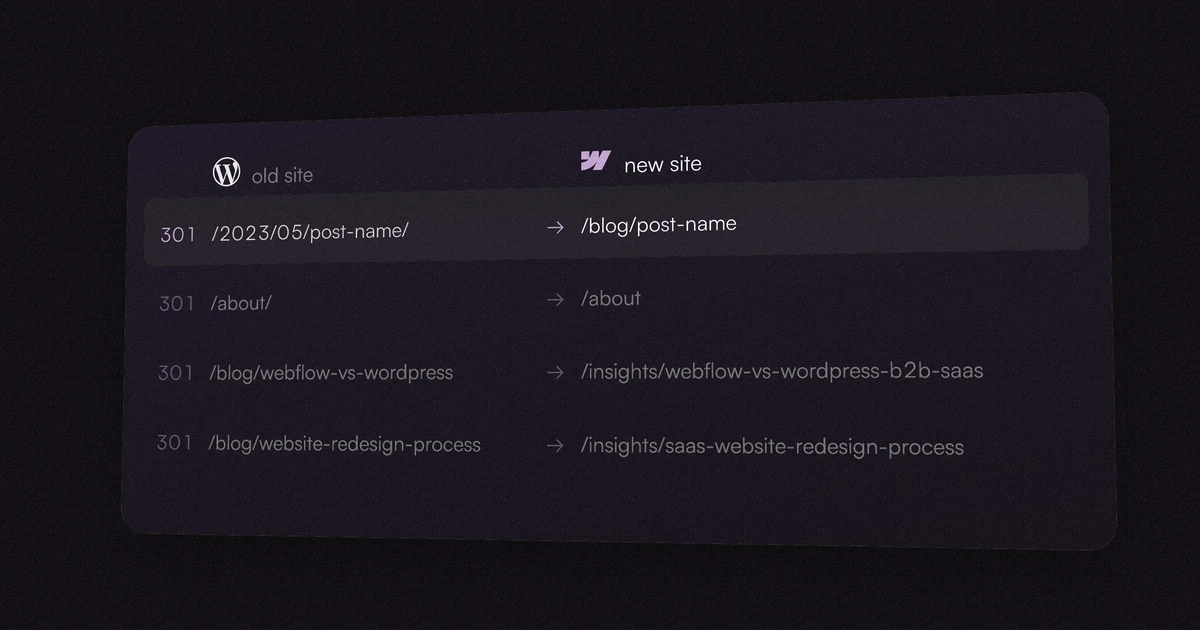
The redirect map is a two-column spreadsheet: every old URL on the left, its new destination on the right. Rules we hold ourselves to:
- 1:1 wherever possible. Each post redirects to its direct equivalent, not to the blog index. Google can treat a redirect to an irrelevant page as a soft 404 — which quietly discards the equity you were trying to preserve.
- Decide deliberately about deleted content. If a page is retired with no equivalent, redirect it to the closest relevant parent only if the topics genuinely overlap; otherwise let it 404 honestly rather than mass-redirecting everything to the homepage.
- Use wildcards for patterns. Webflow supports wildcard redirect rules, and its own guidance recommends them: date-based WordPress permalinks like /2023/%/post-name can often collapse into a handful of pattern rules instead of hundreds of individual entries. Webflow doesn't enforce a hard cap on redirect rules, but recommends staying under roughly 1,000 for performance — wildcards keep you well clear of that.
- Account for trailing slashes. WordPress typically serves /about/; Webflow serves /about. Test both variants of a sample of old URLs after launch.
| Old WordPress URL | New Webflow URL | Redirect type |
|---|---|---|
| /blog/post-name | /blog/post-namesame slug, same collection path | None needed |
| /2023/05/post-name/ | /2023/%/post-namewildcard pattern rule | 301 wildcard |
| /about/ | /aboutno trailing slash | 301 |
Step 3: Rebuild your WordPress content as Webflow CMS collections
WordPress post types map naturally onto Webflow CMS collections: posts become a Blog collection, case studies a Work collection, team members a Team collection, and so on. Two things matter for SEO here:
- Slug parity. If your WordPress blog lived at /blog/post-name, recreate the same collection path and slugs in Webflow and most of your blog needs no redirects at all. If it lived at /2023/05/post-name/, you can't reproduce that structure in Webflow's CMS — that's what the wildcard rules in Step 2 are for.
- Content completeness. Export WordPress content via its built-in export or a CSV plugin, then import into Webflow collections — but audit the result. Rich text quirks, embedded images and internal links are where automated transfers silently drop things. Spot-check your ten most-trafficked posts word by word; a rebuilt page that lost half its body text will lose the rankings the full version earned no matter how clean the redirect is.
Step 4: Move metadata and structured data
Titles and meta descriptions usually live in an SEO plugin (Yoast, Rank Math) rather than in WordPress core — export them from the plugin and carry them over field by field. In Webflow, static pages take titles and descriptions in page settings, and CMS templates bind them from collection fields, so the imported metadata populates every article automatically once mapped.
Then cover the layer most migrations forget:
- Canonical tags. Set the global canonical base URL in Webflow's SEO settings so every page self-references the correct domain.
- Structured data. Whatever JSON-LD your plugins were injecting — Organization, Article, FAQ — needs to be recreated deliberately in Webflow via page settings or embed code. Validate with Google's Rich Results Test after launch.
- Open Graph images and alt text. Both transfer only if someone moves them. Alt text especially: it rarely survives automated exports.
Step 5: Launch day — the technical checklist
The switchover itself is a short, ordered sequence:
- Confirm the "disable indexing" setting is OFF for the production domain (and leave your webflow.io staging subdomain non-indexable).
- Verify robots.txt allows crawling and references the sitemap — Webflow auto-generates sitemap.xml for you.
- Load and spot-check the full redirect map: test your top 25 old URLs by hand, including trailing-slash variants.
- Point DNS at Webflow, publish, and confirm SSL resolves on both the root and www domains.
- Submit the new sitemap in Google Search Console the same day.
- Re-verify analytics and conversion tracking fire on the new site.
Nothing on this list takes longer than an hour; skipping any of them is how migrations make the news internally.
The first 90 days: what to watch
Expect some movement — Google re-crawling a moved site produces a temporary wobble in impressions even when everything is done right, and the published consensus across migration guides puts full stabilization at roughly 60–90 days. What you're watching for in Search Console is the difference between a wobble and a wound:
- Coverage report: a spike in 404s means missed redirects — fix them as they surface, the map is never 100% complete on day one.
- Page indexing: new URLs should move to "indexed" within days to weeks; pages stuck in "crawled, not indexed" for a month deserve a content audit.
- Query-level positions: compare your top 20 queries against pre-migration positions at 30 and 60 days. Isolated drops usually trace to a single page's transfer; broad drops to a technical issue worth escalating.
Hold off on redesigning page content in the same window if you can — changing URLs, design and copy simultaneously makes diagnosis much harder. If you're pairing the migration with a full redesign, our B2B SaaS website redesign guide covers how to sequence the two safely.
Planning a move? Migration is part of every rebuild we scope — see our work, check transparent pricing, or tell us about your site and we'll map the migration risk before you commit to anything.
FAQ
Will I lose my SEO rankings if I migrate from WordPress to Webflow?
Not if the migration preserves your URLs or 301-redirects every changed one, transfers metadata and content completely, and leaves nothing blocking crawlers. Google confirms 301 redirects pass PageRank; a brief re-crawl fluctuation is normal, permanent loss is a process failure, not a platform effect.
How long does a WordPress to Webflow migration take?
The migration mechanics — crawl, redirect map, content transfer, metadata — take days, not months. The overall timeline is set by the rebuild around them; we handle full migrations inside our published 3-4 week rebuild timeline, with the redirect map built in week one, never on launch day.
How do 301 redirects work in Webflow?
You add them under Site settings → Publishing → 301 redirects, one rule per line or as wildcard patterns that match whole URL structures. Webflow recommends keeping the list under about 1,000 rules for performance, which wildcards make easy even for large blogs.
Do I need to keep my old WordPress URL structure?
No — but every URL you change must redirect. Where slug parity is cheap (like /blog/post-name), keep it and skip the redirects entirely. Where WordPress structure can't be reproduced, such as date-based permalinks, redirect patterns to the new clean URLs.
Is Webflow better for SEO than WordPress?
Neither platform ranks for you, but Webflow gives you clean markup, fast hosting, automatic sitemaps and full metadata control natively — things WordPress typically assembles from plugins. For most B2B SaaS marketing sites we consider it the stronger technical foundation; the full comparison is in our Webflow vs WordPress guide.